





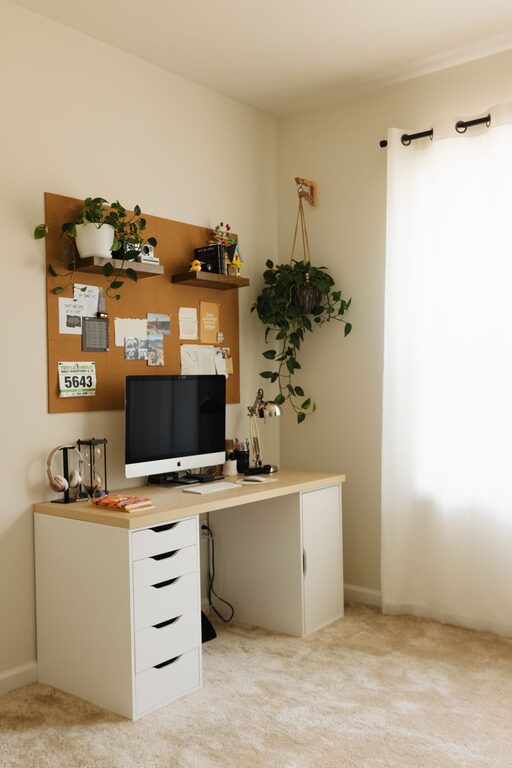
Creating a cozy and productive home workspace is essential for anyone who spends a significant amount of time working from home. With the right setup, you can enhance your focus, reduce stress, and make your workday more enjoyable. In this post, we’ll explore practical tips and ideas to help you design a workspace that feels inviting and keeps you motivated.
Why a Well-Designed Workspace Matters
A well-designed home office isn’t just about aesthetics; it directly impacts how effectively you work. A cozy environment can reduce anxiety and fatigue, while a productive setup helps you stay organized and focused. Balancing comfort with function allows you to maximize your work output while maintaining your wellbeing.
Choose the Right Location
Consider Natural Light
When selecting a spot for your workspace, natural light should be a top priority. Position your desk near a window to take advantage of daylight. Natural lighting improves mood, keeps you alert, and can reduce eye strain.
Minimize Distractions
Choose a quiet corner or room where interruptions are minimal. If you live with others, communicate your working hours to set boundaries. Avoiding high-traffic areas in your home can help you concentrate more easily.
Invest in Ergonomic Furniture
Comfort is key for long hours at your desk. Invest in a chair that provides good lumbar support to prevent back pain. Your desk should be at a height that allows your elbows to rest comfortably at about a 90-degree angle.
Tips for Ergonomics
– Keep your feet flat on the floor or on a footrest.
– Place your computer monitor at eye level to avoid neck strain.
– Use an adjustable chair and desk if possible.
Personalize Your Space
Adding personal touches makes your workspace feel welcoming. Choose colors and decor that inspire you. Plants, artwork, or a favorite mug can brighten the area without creating clutter.
Keep It Simple
Try to maintain a clean and organized space. A clutter-free desk helps reduce mental distractions and keeps your mind focused.
Organize with Purpose
Use Storage Solutions
Shelves, drawers, and organizers can keep your supplies neat and accessible. Label containers so you can quickly find what you need.
Digital Organization
Keep your computer desktop tidy and use cloud storage or external drives to manage files efficiently. Having a clear digital workspace is just as important as a physical one.
Set Up Proper Lighting
In addition to natural light, proper artificial lighting is important for after-dark work or gloomy days. Use a desk lamp with adjustable brightness and direction to reduce shadows and eye strain.
Incorporate Break Areas
If space allows, create a small area for breaks. A comfortable chair or cushion encourages stepping away briefly to refresh your mind, boosting overall productivity.
Maintain a Routine
Establishing regular work hours and breaks helps create structure. Start your day with a quick tidying routine to mentally prepare for work. Consistency fosters discipline and enhances productivity.
Minimize Noise Distractions
If ambient noise is an issue, consider noise-canceling headphones or soft background music. White noise apps can also help mask distracting sounds.
Keep Technology Updated and Organized
Reliable technology reduces frustrations. Make sure your computer, internet connection, and peripherals are up to date. Arrange cables neatly with clips or ties to prevent tangling.
Final Thoughts
Designing a cozy and productive home workspace is a personal journey. Experiment with different setups until you find what works best for you. With thoughtful planning and regular upkeep, your home office can become a place where comfort and efficiency coexist, making work feel less like a chore and more like a satisfying part of your day.




More Stories
Tips for Creating a Cozy and Productive Home Office Space
Tips for Creating a Cozy and Functional Home Office Space
Tips for Creating a Cozy and Inviting Reading Nook at Home